Cloud networking is the architectural foundation that enables resources like virtual machines, databases, and containers to communicate securely. In a traditional data center, networking involves physical routers, switches, and cables. However, in the modern cloud era, these are replaced by Software-Defined Networking (SDN).
Because of this shift, understanding how different providers handle traffic is essential for any cloud engineer. The primary construct in cloud networking is the isolated logical network, known as a Virtual Private Cloud (VPC) in AWS and Google Cloud, or a Virtual Network (VNet) in Microsoft Azure.
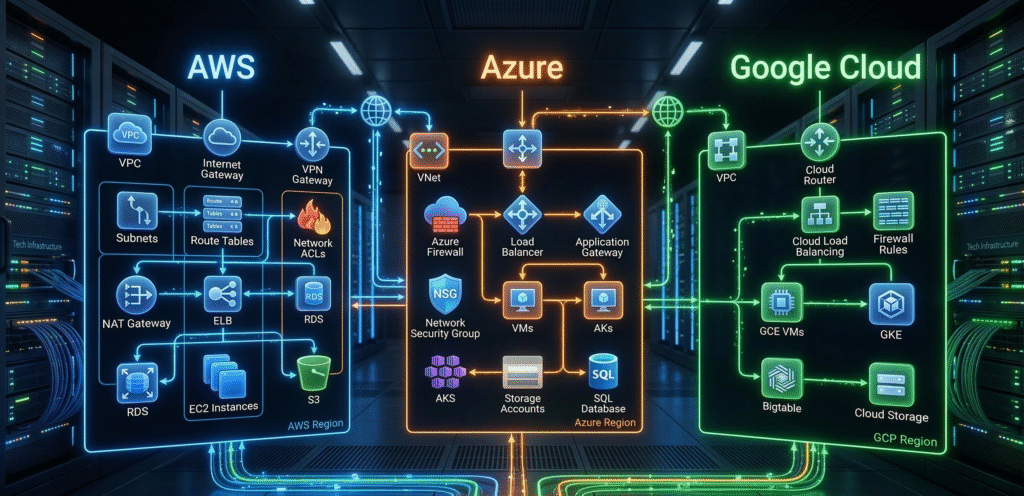
1. Amazon Web Services (AWS) Networking Architecture
AWS is the industry leader in cloud infrastructure, offering a highly mature and granular networking stack. It is important to note that AWS networking is fundamentally regional.
Core Components of AWS Networking:
- VPC (Virtual Private Cloud): A private, isolated section of the AWS Cloud where you can launch resources in a virtual network you define.
- Subnets: A range of IP addresses in your VPC. In AWS, subnets are restricted to a single Availability Zone (AZ).
- Internet Gateway (IGW): A horizontally scaled, redundant component that allows communication between your VPC and the internet.
- NAT Gateway: Enables instances in a private subnet to connect to the internet while preventing the internet from initiating a connection with them.
- Security Groups: Acts as a stateful virtual firewall for instances to control inbound and outbound traffic.
- Network ACLs (Access Control Lists): An optional, stateless layer of security for your VPC that acts as a firewall for controlling traffic at the subnet level.
2. Microsoft Azure Networking Architecture
In contrast to AWS, Microsoft Azure networking is designed for enterprise flexibility and integrates deeply with existing Windows-based infrastructures.
Core Components of Azure Networking:
- VNet (Virtual Network): The fundamental building block for private networks in Azure. Unlike AWS, an Azure VNet can span multiple Availability Zones within a region.
- Subnets: Enables you to segment the virtual network into one or more sub-networks for better resource allocation.
- Network Security Group (NSG): Contains security rules that allow or deny inbound/outbound traffic based on source, destination, port, and protocol.
- Azure Bastion: A fully managed PaaS service providing secure RDP and SSH access to VMs directly via the Azure portal over SSL.
- ExpressRoute: A dedicated service for creating private connections between Microsoft datacenters and on-premises infrastructure.
3. Google Cloud Platform (GCP) Networking Architecture
Finally, Google Cloud offers a unique, global networking infrastructure that is often considered the most performant in terms of latency and ease of management.
Core Components of GCP Networking:
- Global VPC: GCP VPCs are global resources. Therefore, you do not need separate VPCs for different regions; one VPC can contain subnets worldwide.
- Regional Subnets: While the VPC is global, the subnets within it are regional, simplifying global network topology.
- Firewall Rules: Applied at the VPC level using “Target Tags,” which simplifies security management for dynamic groups of instances.
- Cloud Router: Enables dynamic route exchange between your VPC and on-premises networks using BGP.
- Global Load Balancing: Provides a single, global anycast IP address, routing traffic to the closest healthy backend instance across the globe.
Comparative Analysis: AWS vs. Azure vs. GCP
| Feature | Amazon Web Services (AWS) | Microsoft Azure | Google Cloud (GCP) |
| Virtual Network | VPC | VNet | VPC |
| Network Scope | Regional | Regional | Global |
| Subnet Scope | Availability Zone | Regional | Regional |
| Instance Firewall | Security Groups | NSG | Firewall Rules (Tags) |
| Subnet Firewall | Network ACL (NACL) | NSG | Not Applicable |
| Private Access | NAT Gateway | NAT Gateway | Cloud NAT |
| Private Connectivity | Direct Connect | ExpressRoute | Interconnect |
| DNS Service | Route 53 | Azure DNS | Cloud DNS |
Deep Dive: Critical Networking Concepts Explained
To build a production-grade environment, you must understand how these components interact to manage traffic flow and security.
1. Route Tables & Intelligent Routing
Route tables are the “brains” of your network. They contain a set of rules (routes) that determine where network traffic from your subnets or gateways is directed. Furthermore, in hybrid setups, routes can be “propagated” automatically from on-premises routers using BGP.
2. Advanced Load Balancing (L4 vs. L7)
Load balancers act as traffic managers, ensuring high availability by distributing requests across multiple healthy backends.
- Network Load Balancer (L4): Operates at the Transport Layer (TCP/UDP).
- Application Load Balancer (L7): Operates at the Application Layer (HTTP/HTTPS) For a deeper look at traffic management, you can refer to the official OSI Model Guide.
3. VPC/VNet Peering & Transit Gateways
Peering connects two separate networks as if they were one. However, it is not transitive. To solve this, providers offer “Transit Gateways” or “Virtual WANs” that act as a central hub.
4. Hybrid Connectivity: VPN vs. Dedicated Circuits
Connecting your office to the cloud is done via two main methods:
- Site-to-Site VPN: Uses the public internet with IPsec encryption.
- Dedicated Circuits: A physical fiber connection (Direct Connect/ExpressRoute) providing consistent bandwidth and lower latency.
Conclusion and Recommendations
Selecting the right cloud provider depends heavily on your specific cloud networking requirements:
- Choose AWS if you require a highly granular, mature networking environment with extensive third-party integration.
- Choose Azure if your organization relies on Microsoft software and requires enterprise-grade integration.
- Choose Google Cloud if you operate on a global scale and want to reduce the complexity of managing regional networks.
For more tutorials on cloud infrastructure, check out our in detail core networking aritle for more understanding.