
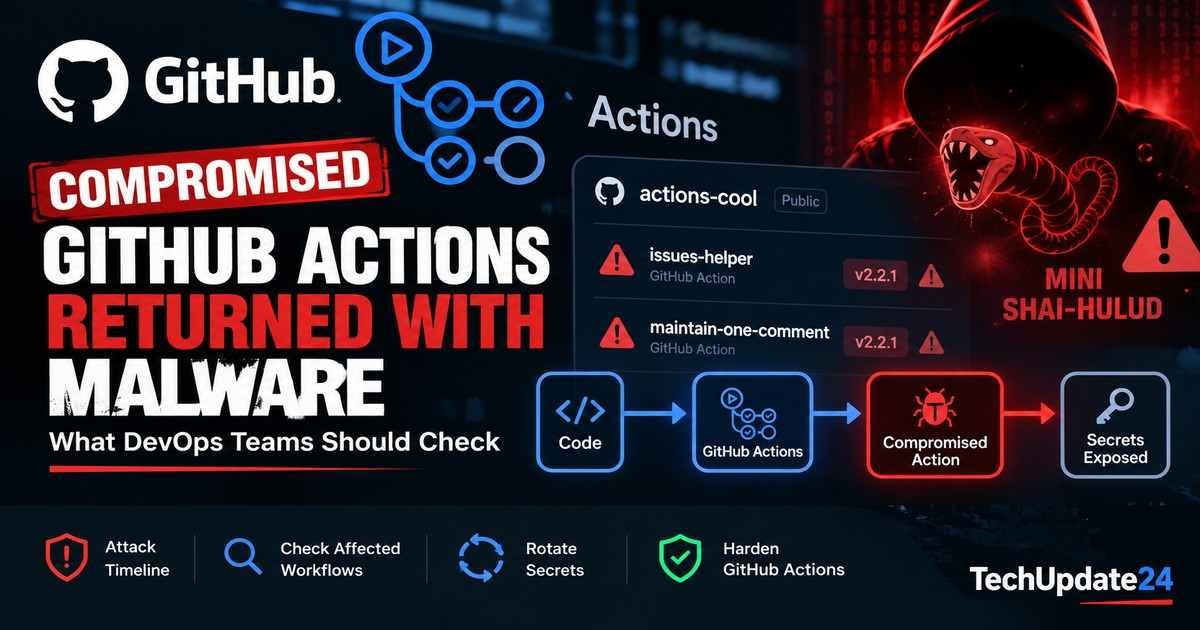
Two compromised GitHub Actions briefly came back online in September 2026 and resumed executing malicious code from the Mini Shai-Hulud campaign, according to new research from Socket. The incident is a sharp reminder that a workflow can become dangerous again even when your own YAML file has not changed.
The affected actions were actions-cool/issues-helper and actions-cool/maintain-one-comment. Both had been compromised in May 2026 and then disabled by GitHub. On September 16, the repositories became reachable again while their malicious release tags still pointed to compromised content. Workflows using those mutable tags could therefore download and run the payload again on their next execution.
Socket says both repositories were disabled again on September 25. The threat actor did not need to publish fresh malware or modify downstream repositories; the old malicious tags were enough to reactivate the risk once the repositories became downloadable.
What Happened to the Compromised GitHub Actions?
The two actions are maintenance utilities commonly used to automate issue and comment housekeeping. They can be triggered on schedules or by repository activity such as new issues or pull requests.
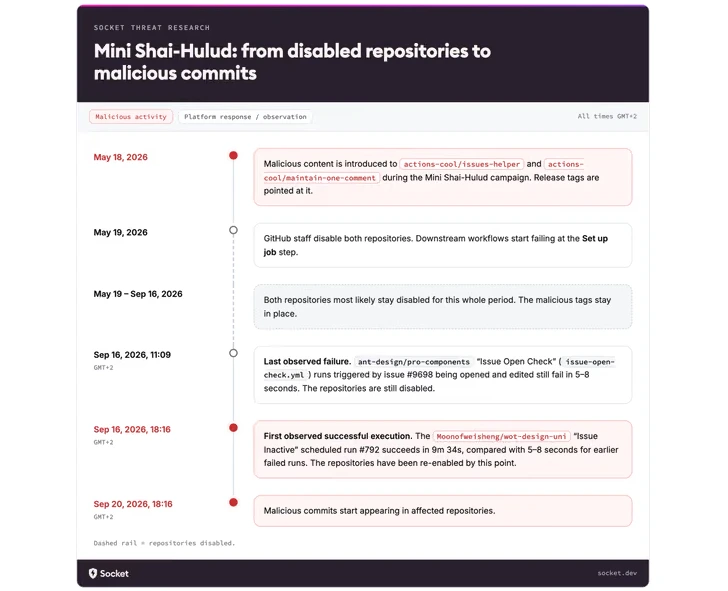
Socket’s investigation traces the original compromise to May 18, 2026. Malicious content was introduced into the actions, and GitHub disabled the repositories the following day. While disabled, GitHub Actions runners could not download them, so dependent workflows failed during the job setup phase before the action code executed.
The critical problem was that disabling the repositories did not remove or rewrite the malicious release tags. When the repositories became accessible again on September 16, workflows referencing those tags automatically resumed fetching what the tags currently pointed to.
Timeline: May Compromise to September Re-Exposure
| Date | What happened |
|---|---|
| May 18, 2026 | Malicious content was introduced into the two actions-cool GitHub Actions. |
| May 19, 2026 | GitHub disabled access to the affected repositories. |
| May–September | Downstream workflows referencing the disabled actions typically failed during job setup because the actions could not be downloaded. |
| September 16, 2026 | The repositories became reachable again while the malicious release tags were still intact. |
| September 16 onward | Tag-based workflows could once again download and execute the compromised action code. |
| September 25, 2026 | Socket reported that both repositories had been disabled again. |
Why Mutable Git Tags Were the Core Risk
A GitHub Actions workflow often references a third-party action like this:
uses: actions-cool/issues-helper@v2.2.1That looks specific, but a Git tag is still a mutable reference. The tag can be moved to another commit later. When a runner starts a job, it resolves the tag and downloads whatever commit the tag points to at that moment.
Socket found that actions-cool/issues-helper@v2.2.1 resolved to commit a0c53dd42fc842d2f9276c5a1d4f9a26abe8713d, which contained the malicious obfuscated payload. Because the tag had not been cleaned up, re-enabling the repository effectively re-enabled execution of that payload for workflows still using the tag.
This is why GitHub recommends pinning third-party actions to a full-length commit SHA. GitHub’s own security guidance states that a full commit SHA is immutable, while tags can move to different code.
Who Was Potentially Exposed?
Socket reported that GitHub’s dependency graph listed roughly 15,000 dependent repositories for actions-cool/issues-helper alone. That does not mean all 15,000 were confirmed compromised. Some may have pinned safe commits, some may not have run during the exposure window, and Socket had not determined how many dependents used mutable tags.
Still, the exposure mattered because these actions often run automatically. A scheduled workflow or issue-triggered workflow could execute without a developer changing any code after September 16.
How the Mini Shai-Hulud Payload Fits In
The actions-cool compromise was linked to the broader Mini Shai-Hulud software supply-chain activity observed across npm and other developer ecosystems in 2026. Socket previously documented waves involving hundreds of compromised package versions and credential-stealing payloads targeting developer machines and CI/CD environments.
Socket linked the GitHub Actions activity to the same cluster based in part on shared infrastructure, including the exfiltration domain t[.]m-kosche[.]com. In related Mini Shai-Hulud analysis, Socket found malware designed to collect cloud credentials, package-registry credentials and CI secrets before sending encrypted data to attacker-controlled infrastructure.
The important operational lesson is that CI/CD environments often have access to exactly the credentials attackers want: package publishing tokens, cloud credentials, repository tokens, deployment secrets and production automation identities.
What DevOps Teams Should Check Immediately
- Search all workflow files for the affected actions. Look under
.github/workflows/foractions-cool/issues-helper@andactions-cool/maintain-one-comment@. - Treat tag-based references as suspect. Socket specifically advises treating references such as
actions-cool/issues-helper@v2.2.1as affected. - Remove the actions or replace them with a verified clean commit SHA. Any replacement SHA should be reviewed and should predate the May 18 compromise.
- Rotate secrets available to affected workflows. If a workflow using either action ran after September 16, identify every secret, token and credential it could access.
- Review the workflow’s
GITHUB_TOKENpermissions. Determine whether the job had read-only access or broader repository write permissions. - Inspect workflow history. Socket recommends looking for jobs that suddenly started succeeding after a long period of fast setup failures, or whose runtime jumped from seconds to minutes.
- Audit repository history after September 16. Check for unexpected commits, branches, releases or workflow changes.
Useful Search Commands for Repository Owners
For a local repository, a simple recursive search can quickly identify references:
grep -RInE 'actions-cool/(issues-helper|maintain-one-comment)@' .github/workflows/If your organization has many repositories, use GitHub code search or your internal repository inventory to find the same patterns across all workflow files. The goal is not only to locate the two affected actions, but also to identify a broader class of third-party actions still referenced by mutable tags.
What to Look for in GitHub Actions Logs
Socket highlighted several observable clues from affected runs. Before the repositories were re-enabled, workflows could fail almost immediately during Set up job with repository-access errors. After re-enablement, the same workflows could run for several minutes because the compromised action was once again downloadable.
In runner logs, Socket recommends looking for unexpected downloads of oven-sh/setup-bun or execution of bun run $GITHUB_ACTION_PATH/index.js as part of either affected action.
Rotate More Than Just One Secret
Credential response should be based on what the workflow could access, not on what developers assume the action needed. Review repository and organization secrets, environment secrets, cloud credentials, package-registry tokens and the effective permissions of GITHUB_TOKEN.
Long-lived cloud credentials are particularly dangerous because they can remain usable after the original CI incident. Our analysis of leaked AWS keys explains why exposed long-lived credentials should be revoked or rotated rather than treated as safe after a repository cleanup.
How to Harden GitHub Actions Against Similar Incidents
1. Pin third-party actions to full commit SHAs
Instead of:
uses: owner/action@v2use a reviewed full-length commit SHA:
uses: owner/action@a824008085750b8e136effc585c3cd6082bd575fGitHub also provides repository and organization policies that can require actions to be pinned to full-length commit SHAs.
2. Explicitly minimize workflow permissions
GitHub recommends defining the minimum permissions a workflow needs with the permissions key rather than allowing broader token access by default.
permissions:
  contents: read
If a compromised action only has read access, the blast radius can be significantly smaller than a workflow with repository write, package publishing or deployment permissions.
3. Restrict which actions can run
Organizations can allow only selected actions and reusable workflows. This reduces exposure to unreviewed third-party dependencies and gives security teams a manageable allowlist.
4. Prefer OIDC over static cloud credentials
GitHub recommends OpenID Connect for cloud-provider authentication where supported. Short-lived federated credentials reduce the value of a stolen long-lived key and can be scoped to specific repositories, branches or environments.
5. Treat third-party actions as code dependencies
A GitHub Action is executable code inside your CI environment. Review who maintains it, what permissions it receives, how often it changes and whether your organization has an approval process for introducing new actions.
This is the same broader DevSecOps principle discussed in our DevSecOps security guide: security controls should be part of the delivery workflow, not added only after deployment.
Why Full-SHA Pinning Would Have Prevented This Re-Exposure
The September incident is a useful example because downstream workflow files did not need to change. A repository using a mutable tag trusted the current state of an upstream tag every time the workflow ran.
A workflow pinned to a reviewed full commit SHA from before May 18 would continue referencing that exact object. Re-enabling the upstream repository would not silently redirect the workflow to the malicious tagged commit.
Pinning is not a complete supply-chain security strategy: teams still need to review the SHA they choose and update dependencies deliberately. But it removes one important class of tag-retargeting risk.
What This Incident Does — and Does Not — Prove
| Supported by current evidence | Not established by current evidence |
|---|---|
| The two actions-cool repositories were compromised in May and later became reachable again with malicious tags intact. | That every dependent repository was compromised. |
| Tag-based references could resume executing malicious content when the repositories were re-enabled. | That GitHub intentionally re-enabled malicious code. |
| Socket observed roughly 15,000 dependents for issues-helper. | That all of those dependents used vulnerable tag references or ran during the exposure window. |
| Full-SHA pinning protects against a tag later being moved to different code. | That SHA pinning alone eliminates all CI/CD supply-chain risk. |
Bottom Line
This incident did not require a new exploit. The dangerous code had already been present since May. Once the affected repositories became downloadable again, mutable tag references allowed downstream workflows to resume executing it.
For DevOps and platform teams, the practical response is straightforward: find the affected actions, rotate any exposed secrets, audit workflow and repository history, minimize token permissions and move third-party action references from mutable tags to reviewed full commit SHAs.
